Studio A
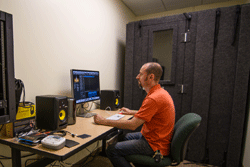
Studio A is set up to be the heart of the recording facilities in the Media Commons. Currently the room contains all the hardware and software that you might need to create and edit audio recordings, along with software for video editing, photography and 3D animation.
In addition to the Mac Pro computer, the room has an 8 channel audio interface, high quality studio monitors, microphones, headphones and the Whisper Room. The Whisper Room is an acoustically- isolated sound booth that can be used for audio recording where the mediation of background noise is important e.g. voice overs for video projects. Studio A also has access to microphones in Studio B if a larger room is needed for audio recording e.g. recording interviews.
To gain access to the room and use the equipment, users are highly encouraged to attend a training session. Please contact Paul Benham to arrange for training.
Capacity: 3
Book Studio A
Studio B
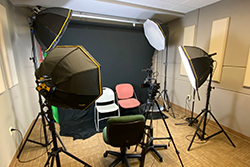
Studio B is an ideal space for filming video, recording audio or taking photographs in a controlled environment. Make use of the green screen set up for compositing video, record an audio interview with a group of people making use of the Studio A equipment, or use the shooting table and light tents for high quality photography.
Capacity: 4
Book Studio B
Studio C
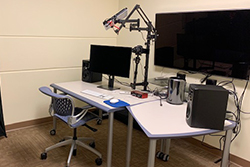
This small studio is equipped with a MacPro computer, Dual 4K monitors, professional audio monitoring equipment, Adobe CC, Final Cut Pro, and lighting, camera and audio recording equipment for self-service video recording or livestreaming direct to computer.
Capacity: 2
Book Studio C
Studio D
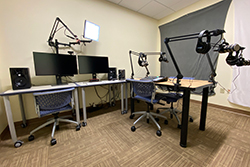
Studio D is designed for podcast production and professional video and audio editing. In addition to a MacPro tower and two 4K monitors, the space includes a Rode Procaster Studio audio console, four professional mics, headphones for guests and hosts, and the ability to connect and record outside guests via cellphone (Bluetooth) or Zoom.
For training and support, please contact Colin Kelley.
Capacity: 4
Book Studio D